Whitepaper — When Growth Exposes the Cracks Read report

An ERP to keep orders, inventory and cost on track.

Streamline your sales channels, products, and inventory with an AI-driven cloud ERP system that gets you organized, working efficiently, and growing.

AI-driven inventory management

Inventory made simple, synced with QuickBooks Online

ChannelSnap makes inventory management easy.

If one of your biggest problems is inventory management, it doesn’t have to be. Whether you have no system at all, you’re drowning in spreadsheets, or you’re stuck paying for a bloated ERP, ChannelSnap can help.

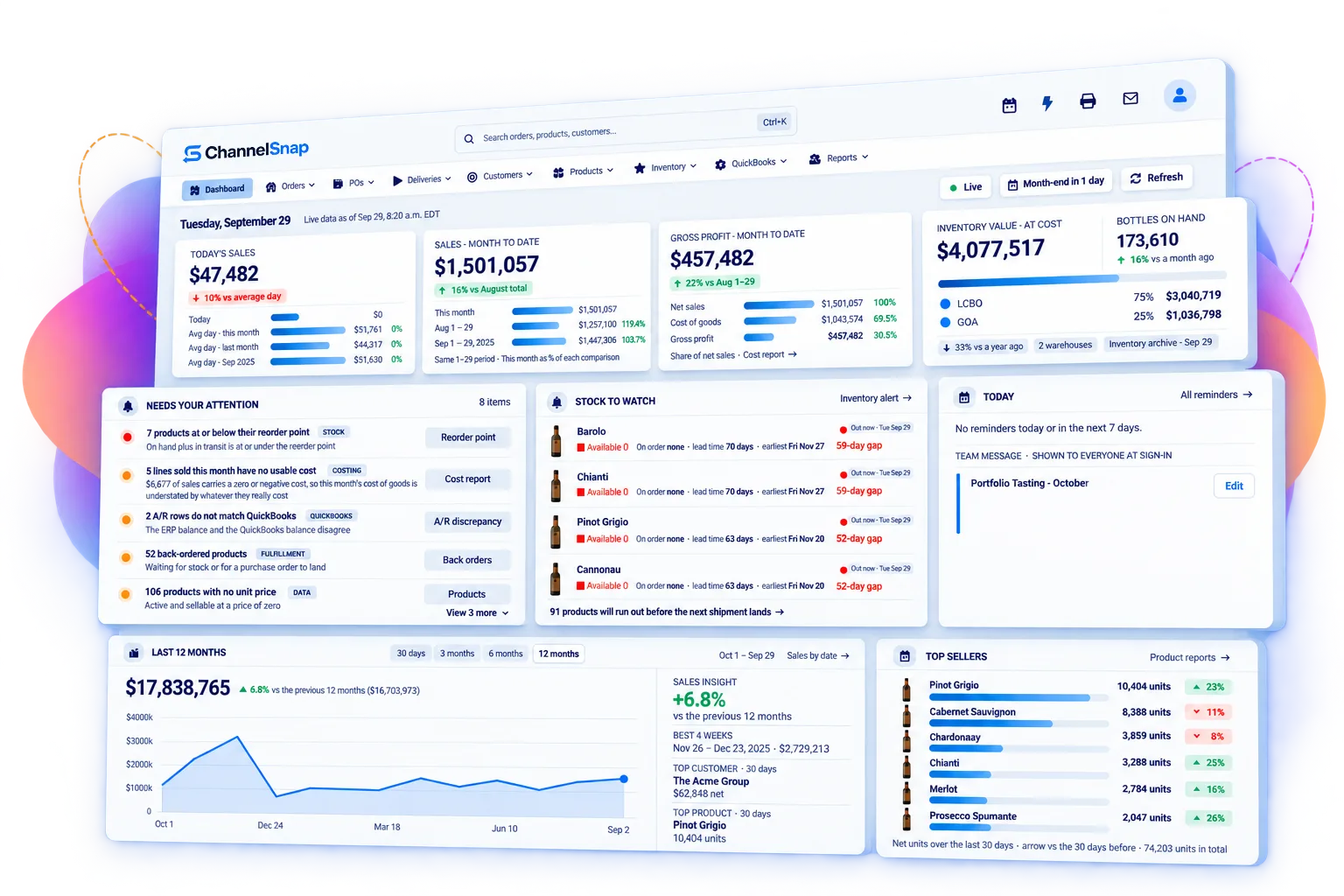
The ChannelSnap dashboard showing sales and gross profit for the month, inventory value and bottles on hand, items needing attention, stock to watch and top sellers
  • Forecasts that learn your seasonality

    Demand forecasting on 13 months of trend, per SKU and per location, so the buy is grounded in what actually sells.

  • Reorder suggestions, lead time included

    Suggested purchase orders arrive with supplier lead times and minimums already applied. Approve, adjust, send.

  • One live count across every channel

    Web, marketplace, wholesale and retail draw from one stock pool with allocation guardrails, so you never sell what you do not have.

  • Accuracy you can audit

    Barcode scanning on every receipt, pick and count, with a transaction trail behind every movement.

In the field

Pre-configured for your industry.

Wine & Beverage Agents

One system for every board you sell through.

A feature-rich cloud-based ERP system to help you increase efficiencies, eliminate errors, stay on top of sales, master inventory at LCBO, AGLC, BCLDB & other commissions, schedule, forecast and reduce costs.

See the fit for wine & beverage agents


A wine agent examining a bottle of red at a tasting bar
Wholesale & Distribution

Distribution ERP that lets your sales flow in.

Simplify distribution and boost your product sales effortlessly across every channel, all in one place. Say hello to streamlined operations and smoother growth!

See the fit for wholesale & distribution
Warehouse worker in a hi-vis vest scanning a carton against a tablet in a racked aisle
eCommerce & OmniChannel

Shopify stores that turn visitors into customers.

Integrate Shopify, Squarespace and other e-commerce platforms to ensure inventory, products & orders are always up-to-date. Say goodbye to manual updates and hello to smooth online operations!

See the fit for ecommerce & omnichannel
Retailer checking orders on a tablet at a packing bench stacked with parcels
Manufacturing

From bill of material to the service call, one thread.

Take control of your entire manufacturing process, from purchasing to sales. Gain valuable insights, optimize workflows, and drive efficiency across your entire operation!

See the fit for manufacturing
Machinist in safety glasses checking a job on a tablet beside a CNC machine and finished parts

The platform

Many modules.
One set of numbers.

No need to juggle multiple systems for your business. With ChannelSnap, everything you need is in one place and accessible anytime, on any device.

See every module

Inventory Management

A 360-degree view of every unit you own, wherever it sits. Prevent disruptions and stay ahead with proactive stock management.

360° stock visibility
  • Reorder pointsAvoid costly interruptions. Never run out of stock and materials.
  • Product availabilityTrack sales volume, existing inventory and supplier lead times so you know exactly when to reorder.
  • TraceabilityTrack expiry dates, serial numbers and batches to ensure recall readiness.
  • Back order managementKeep track of all back orders and fulfil them.
Explore inventory management

Connected to the tools you already run.

Storefronts, payments, provincial boards, shipping and accounting — connected two-way and in real time. See every integration.

  • Shopify
  • Squarespace
  • QuickBooks Online
  • Clover
  • Moneris
  • Elavon
  • LCBO
  • AGLC
  • BCLDB
  • SuccessByEmail
  • Shipnoble
  • Google Maps
  • RoadWarrior
  • ChannelSnap
  • ShipStation

* Third-party names and logos are the property of their respective owners.

Are spreadsheets and manual work quietly setting your ceiling?

Growth does not break a business all at once. It exposes the cracks — the re-keying, the stale stock figure, the margin nobody can verify. Here is what changes.

  • One live count, written once, read by every channel.
  • Landed-cost margin visible on the line before you confirm.
  • Channels share a stock pool with allocation guardrails.
  • Reorder suggestions arrive with supplier lead time applied.
  • Transactions post to QuickBooks Online as they happen.
  • Status, tracking and proof of delivery on the order record.

The cost of juggling systems

Fragmented systems don’t happen overnight.

One platformAny deviceAnytime
  • Data is entered more than once

    Every re-key is a chance to be wrong, and the version that is wrong is usually the one a customer sees.

  • Nobody owns the truth

    When two systems disagree, the business runs on whichever screen the loudest person trusts.

  • Decisions wait for reports

    By the time the analysis is assembled, the situation it describes has already moved on.

Read the whitepaper — When Growth Exposes the Cracks

What changes when the
numbers agree.

65%
less labour spent on manual data entry and re-keying
1.25x
increase in inventory turnover across deployments
4–6 wks
to a live implementation, not 6–12 months
1 system
replacing spreadsheets, portals and disconnected tools

Figures reflect averages observed across ChannelSnap deployments. Your scoping call produces a projection based on your own volumes.

Live in four to six weeks, not four to six quarters.

Most ERP projects fail on duration, not features. Ours are run by the people who build the product, with a fixed shape and a defined end.

How our services work
  1. Week 1

    Scope and data

    We map your items, customers, suppliers, pricing and open transactions, and agree what comes across and what gets retired.

  2. Week 2

    Configure

    Locations, costing, workflows, permissions, price lists and document templates configured to how you actually trade.

  3. Week 3

    Migrate and integrate

    Historical data loaded, QuickBooks Online and your storefront connected, balances reconciled against your existing system.

  4. Week 4

    Train on real work

    Your team runs live transactions in a parallel environment. Training on your data, not a demo company.

  5. Weeks 5–6

    Go live and settle

    Cutover, hypercare, and the tuning that only surfaces once real volume flows through the system.

Compare with the 6–12 month average for mid-market ERP deployments.

Questions

Straight answers, before the demo.

What is ChannelSnap ERP?

ChannelSnap is a real-time cloud ERP for businesses that move physical product. It runs inventory, purchasing, sales orders, warehouse operations, delivery, eCommerce synchronisation, CRM, forecasting and reporting on one database, and posts financial transactions to QuickBooks Online.

Who is ChannelSnap built for?

Distributors, importers, wholesalers, wine and beverage alcohol agents, manufacturers with field service, and omnichannel sellers — typically businesses between roughly $1M and $150M in revenue that have outgrown spreadsheets and entry-level accounting software but do not want a multi-year enterprise ERP project.

How long does implementation take?

Four to six weeks from kickoff to live operation in a typical deployment, including data migration, configuration, integration and training. The mid-market ERP average is six to twelve months, and duration is the single biggest predictor of a failed ERP project.

Who actually does the implementation?

We do. The people who build ChannelSnap configure it, migrate your data and train your team. There is no reseller hand-off and no partner running a discovery phase that bills for a year. It is also why four to six weeks is realistic — the team doing the work does not have to learn the product first, and a question about what the software can do gets answered rather than estimated.

What happens to our existing data?

It comes with you, and you decide what does not. In the first week we map your items, customers, suppliers, pricing and open transactions, and agree what is worth migrating and what is better retired than carried forward. Historical data is loaded in week three and balances are reconciled against your existing system, so you are comparing the two rather than trusting one on faith. Your team then runs live transactions in a parallel environment before cutover.

Does ChannelSnap replace our accounting system?

No. ChannelSnap runs operations and inventory accounting, then posts invoices, credits, bills, payments and adjustments to QuickBooks Online with the correct account, tax and class mapping. Although ChannelSnap retains all of your transactions and financial data, your accountant keeps the tool they know.

Do we need an IT person to run it?

No. ChannelSnap runs on managed cloud infrastructure, so there is no server to buy, patch or back up, and no upgrade project to schedule. Permissions are set per user, per module and per location from inside the application — administration an operations manager can handle without involving anyone technical. It runs in a browser on any device.

Can our reps use it on the road?

Yes. Sales reps place orders and check live inventory from their phones, and see their own customers without reaching another rep’s accounts. Drivers get the same treatment through a mobile delivery app: the day’s schedule, then signatures and proof-of-delivery photos captured at the door and reported back in real time.

How is ChannelSnap different from a bigger-name ERP?

Scope and speed. Large ERPs are expensive and configurable enough to model anything, which is why they take a year and a systems integrator to deploy. ChannelSnap covers the operational core deeply, ships pre-configured for specific trades, is highly configurable, and is implemented by the team that builds it.

Book a demo

See it run against your own numbers.

A working session, not a slide deck. Bring your item list, your channels and the report you cannot produce today — we will show you where each of them lives in ChannelSnap.

  • 60 minutes, run by an implementation consultant
  • Your data and your workflows, not a demo company
  • Straight answer on fit, cost and timeline